


IMPORTANT eTakeoff DIMENSION NOTIFICATION
Due to issues with the latest Dimension release, you can roll your Dimension version back to version 8.2-15 by following the steps below.
NOTE that the Dimension Installer retains prior versions in the Windows Program Uninstall Dialog. You will either need to:
(1.) Uninstall a few versions of Dimension, then install the Dimension Upgrade Version 8.2-15
OR
(2.) Uninstall all versions of Dimension, then install Dimension New Version 8.2-15
_____________________________________________________________________________________________________________
(1.) If the Programs and Features Window has versions lower than 8.2-15, you will need to uninstall the highest version backwards to and including Version 8.2-15.
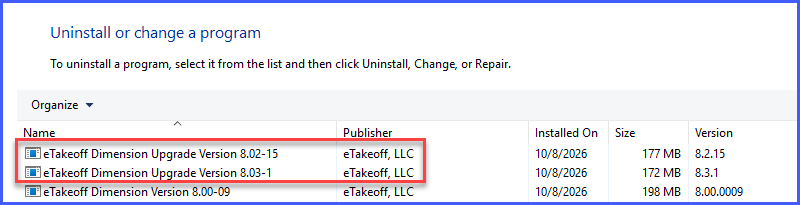
In the above example, you would perform the following steps in order:
- Uninstall "eTakeoff Dimension Upgrade Version 8.03-1"
- Uninstall "eTakeoff Dimension Upgrade Version 8.02-15"
- Install Dimension Upgrade Version 8.02-15
(2.) If the Programs and Features Window does NOT contain prior versions to 8.2-15, you will need to uninstall the highest version backwards to and including version 8.2-15.
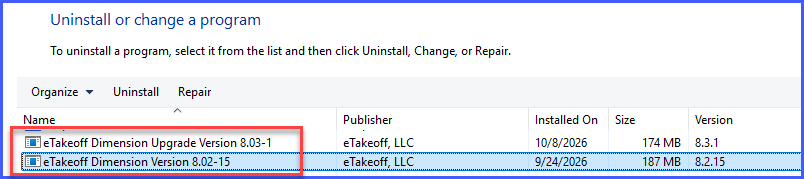
In the above example, you would
- Uninstall "eTakeoff Dimension Upgrade Version 8.03-1"
- Uninstall "eTakeoff Dimension Version 8.02-15"
- Install Dimension New Version 8.02-15
WARNING : If you want to clean up all previous versions of Dimension, do NOT uninstall versions 5.06-29 and below without making a back up of your project / data folders and files first.

