Silently Install eTakeoff Dimension from Command Prompt

Mar 19, 2026
 42
42
To install eTakeoff Dimension silently with no installer User Interface shown at all, follow the procedure below.
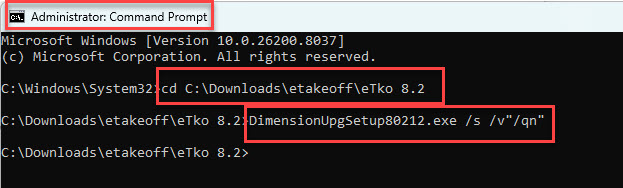
- Open a command prompt in administrator mode.
- Change the folder to the location of the installation file.
- Type {Installer File Name}.exe /s /v"/qn"
- See examples below.
DimensionNewSetup80212.exe /s /v"/qn"
DimensionUpgSetup80212.exe /s /v"/qn"